TanStack Start Server Functions: How They Work and When You Still Need REST
Over the last year I’ve built dozens of web applications using TanStack Start on Cloudflare Workers. The developer experience (DX) is so lovely that it has become my go-to framework for web applications.
When I started using TanStack Start, I looked at it through the lens of my experience with Next.js and React Router. I vividly remember searching:
How to create an API Route in TanStack Start?
And not getting a satisfactory answer.
This article is my attempt to answer that question for you. I do so by showing how TanStack Start server functions work under the hood, so that by the end of this article you’ll be implementing server functions confidently instead of creating REST endpoints.
When to use a REST API?
While server functions are idiomatic TanStack Start, there are cases where you might need to implement a REST endpoint:
- Third party callbacks like webhooks and OAuth
- Endpoints used for both web and native clients
For 2, I’d personally use Hono.js, but these are some things you could want an endpoint for.
How to create a REST endpoint / API Route
As I mentioned in the introduction, TanStack Start has no notion of an API route, just server routes. But creating something that behaves like an API route in Next.js is possible.
First you create a new empty file, e.g. touch routes/api/ping.ts. If you have a dev server running or run the build, the Vite plugin will populate the file for you and update routeTree.gen.ts automatically.
import { createFileRoute } from '@tanstack/react-router'
export const Route = createFileRoute('/api/ping')({  component: RouteComponent,})
function RouteComponent() {  return <div>Hello "/api/ping"!</div>}
This is a Route Component. To turn it into an “API Route” we return replace the component with a server handler that returns JSON instead:
import { createFileRoute } from '@tanstack/react-router'
export const Route = createFileRoute('/api/ping')({  component: RouteComponent,  server: {    handlers: {      GET: async () => {        return Response.json({ message: 'Pong' })      },    },  },})
function RouteComponent() {  return <div>Hello "/api/ping"!</div>}
Now you technically have an API route. If you wanted to create a webhook or OAuth callback, great!
But idiomatic TanStack Start uses server functions. Once you get comfortable with them, you’ll only reach for REST endpoints when you absolutely have to.
Creating a TanStack Start Server Function
Server functions are as the name suggests, functions that run on the server. Yet the beauty is that you can call them from anywhere: loaders, middleware, React components, useEffect hooks (don’t) and even from other server functions.
To illustrate this, let’s create a simple server function.
import { createServerFn } from '@tanstack/react-start'
export const ping = createServerFn({ method: 'GET' }).handler(async () => {  console.log('ping called on the server')
  return {    message: 'Pong',    timestamp: Date.now(),  }})
While I used an incredibly simple function body, this could realistically be anything. A complex database query, a full user signup flow, you name it.
If you don’t specify a method, it defaults to GET.
I personally think it’s good practice to specify GET or POST and separate your server functions by queries/commands.
If you forget to specify it and try to send FormData, you’ll get a type error.
The Anatomy of a TanStack Server Function
What actually happens now when you call a server function? To figure this out I spent some time looking at the TanStack Router source code and build output with Vite minification disabled.
When you build your TanStack Start app, each server function gets registered in a manifest object, basically a look-up table. The key will be a hash of the server function path + name and the value the export name and dynamic import:
const manifest = { "908da24805984717a3edab6cd2dd739996a8502f77cb1d41f3fbd72a3fe0e021": {  functionName: "ping_createServerFn_handler",  importer: () => import("./assets/ping.functions-D-rX0l5n.js")} }
async function getServerFnById(id) {  const serverFnInfo = manifest[id];  const fnModule = await serverFnInfo.importer();  const action = fnModule[serverFnInfo.functionName];  return action;}
The TanStack Start compiler (a Vite plugin), creates three separate implementations of your server function.
- A server RPC handler — the file that actually contains the server function’s body (whatever is in .handler())
- A client stub — your server function stripped of its body and replaced with a
fetchhandler - An SSR wrapper — your server function with a dynamic import of the handler (1)
Our simple ping.functions.ts server function got transformed into ping.functions-D-rX0l5n.js. This is important because the client stub and SSR wrapper both call the server RPC. This prevents server side code from ever showing up in your client bundle.
The compiled handler (1) looks as follows. Note the ID matches the one in the manifest example earlier.
import { c as createServerRpc } from "./createServerRpc-D_-6bKnO.js";import { c as createServerFn } from "../server.js";
const ping_createServerFn_handler = createServerRpc({  id: "908da24805984717a3edab6cd2dd739996a8502f77cb1d41f3fbd72a3fe0e021",  name: "ping",  filename: "src/server-fns/ping.functions.ts"}, (opts) => ping.__executeServer(opts));const ping = createServerFn({  method: "GET"}).handler(ping_createServerFn_handler, async () => {  console.log("ping called on the server");  return {    message: "Pong",    timestamp: Date.now()  };});
export {  ping_createServerFn_handler};
Let’s start with figuring out what happens when you call a server function inside of a route’s loader function.
Server Functions on the Server (During SSR)
To illustrate how this works, I created a very simple route:
import { createFileRoute } from '@tanstack/react-router'import { ping } from '#/server-fns/ping.functions'
export const Route = createFileRoute('/ping-example')({  loader: async () => {    const result = await ping()    return { pingData: result }  },  component: PingExample,})
function PingExample() {  const { pingData } = Route.useLoaderData()
  return (    <div>      <h1>SSR Ping Route</h1>      <p>This data was loaded via the route loader (server function as SSR):</p>      <pre>{JSON.stringify(pingData, null, 2)}</pre>    </div>  )}
What happens when we curl http://localhost:3000/ping-example?
$ curl localhost:3000/ping-example<!DOCTYPE html><!-- truncated and slightly reformatted by me for brevity --><h1 data-tsd-source="/src/routes/ping-example.tsx:17:7">SSR Ping Route</h1><p data-tsd-source="/src/routes/ping-example.tsx:18:7">This data was loaded via the route loader (server function as SSR):</p><pre data-tsd-source="/src/routes/ping-example.tsx:19:7">{ "message": "Pong", "timestamp": 1774902635721}</pre>As you can see it’s rendered the response on the server, no client JavaScript required.
When we rendered ping-example-B_TfXSaK.js, TanStack Router called the loader. The route loader created an SsrRpc (3) in our list above, which looks like:
var createSsrRpc = (functionId, importer) => {  const url = "/_serverFn/" + functionId;  const serverFnMeta = { id: functionId };  const fn = async (...args) => {    return (await getServerFnById(functionId))(...args);  };  return Object.assign(fn, {    url,    serverFnMeta,    [TSS_SERVER_FUNCTION]: true  });};
const ping = createServerFn({  method: "GET"}).handler(createSsrRpc("908da24805984717a3edab6cd2dd739996a8502f77cb1d41f3fbd72a3fe0e021"));const $$splitComponentImporter$2 = () => import("./ping-example-B_TfXSaK.js");const Route$3 = createFileRoute("/ping-example")({  loader: async () => {    const result = await ping();    return {      pingData: result    };  },  component: lazyRouteComponent($$splitComponentImporter$2, "component")});
We should see some familiar code:
getServerFnByIdgets the actual function dynamically imported. Note that there is no HTTP overheadcreateServerFn(...).handler(...)replaced the handler withcreateSsrRpc
Notice how this is the second variant of our server function. The first one was the actual server RPC. This one wraps it in createSsrRpc to dynamically load that function body and cleverly bundle our function.
The server function RPC sequence thus looks as follows:
  sequenceDiagram
      actor User
      participant Server as server.js
      participant Router as router.js
      participant Handler as ping.js

      User->>Server: Request /ping-example
      Server->>Router: Run route loader
      Router->>Router: loader calls ping()
      Note right of Router: SSR wrapper

      Router->>Server: Resolve server function
      Note right of Server: In-process lookup, no HTTP!!

      Server->>Handler: Dynamic import ping.js
      Handler->>Handler: Run real ping handler
      Handler-->>Server: Return result
      Server-->>Router: Return result
      Router-->>User: SSR HTML
Because it’s so important, I’ll reiterate: the server function dynamically imports the body and thus totally skips the HTTP layer.
Compare this to a REST endpoint, which requires you to do fetch('/api/ping') even though it’s already running on the server.
Server Functions on the Client
An incredibly powerful feature of server functions is how easy it is to call them on the client.
To show how to call server functions on the client, I added a simple button to our SSR route that alerts the result of our ping server function:
import { createFileRoute } from '@tanstack/react-router'import { ping } from '#/server-fns/ping.functions'import { useServerFn } from '@tanstack/react-start'
export const Route = createFileRoute('/ping-example')({  loader: async () => {    const result = await ping()    return { pingData: result }  },  component: SsrPing,})
function SsrPing() {  const { pingData } = Route.useLoaderData()  const handlePing = useServerFn(ping)
  return (    <div>      <h1>SSR Ping Route</h1>      <p>This data was loaded via the route loader (server function as SSR):</p>      <pre>{JSON.stringify(pingData, null, 2)}</pre>      <button onClick={() => handlePing().then(data => console.log(data))}>Ping!</button>    </div>  )}
We added 3 lines of code.. And can now call our server function from the client… 3 lines of code!
Technically you could call the server function directly (without useServerFn) but it nicely wraps it with useCallback and adds error/redirect handling.
Let’s look at our implementation of ping inside of our client bundle:
function createClientRpc(functionId) {  const url = "/_serverFn/" + functionId;  const serverFnMeta = { id: functionId };  const clientFn = (...args) => {    const startFetch = getStartOptions()?.serverFns?.fetch;    return serverFnFetcher(url, args, startFetch ?? fetch);  };  return Object.assign(clientFn, {    url,    serverFnMeta,    [TSS_SERVER_FUNCTION]: true  });}
const ping = createServerFn({  method: "GET"}).handler(createClientRpc("908da24805984717a3edab6cd2dd739996a8502f77cb1d41f3fbd72a3fe0e021"));const $$splitComponentImporter$2 = () => __vitePreload(() => import("./ping-example-CTodlY7p.js"), true ? [] : void 0);const Route$2 = createFileRoute("/ping-example")({  loader: async () => {    const result = await ping();    return {      pingData: result    };  },  component: lazyRouteComponent($$splitComponentImporter$2, "component")});
You should recognize the manifest hash by now and once again the body of our server function got replaced. This time with createClientRpc("908da24805984717a3edab6cd2dd739996a8502f77cb1d41f3fbd72a3fe0e021").
That function itself is incredibly similar to createSsrRpc but instead of calling the handler, it now makes a fetch request for us!
  sequenceDiagram
      actor User
      participant Browser as main.js
      participant Server as server.js
      participant Handler as ping.js

      User->>Browser: Click "Ping!"
      Browser->>Browser: handlePing() calls ping()
      Note right of Browser: Client RPC wrapper via useServerFn

      Browser->>Server: fetch("/_serverFn/908da2...")
      Note right of Server: HTTP GET

      Server->>Server: Resolve function ID
      Server->>Handler: Dynamic import ping.js
      Handler->>Handler: Run real ping handler
      Handler-->>Server: Return result
      Server-->>Browser: Serialized result
      Browser-->>User: Update UI
As you can see this is very similar to our call during SSR.
Input Validation and Type Safety
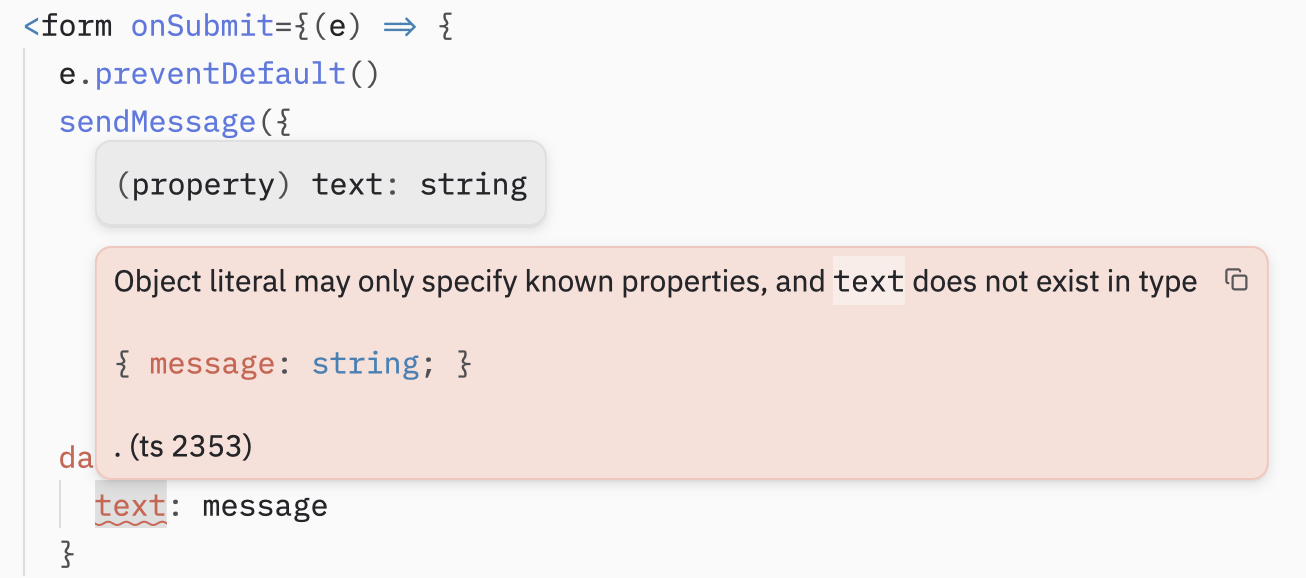
Another big benefit of server functions over traditional REST is built-in input validation and type-safety. So far we’ve only shown a simple ping server function for illustration purposes. In a real application you’d have various server functions with parameters.
Type safety is something you get out of the box for free, which otherwise would require an OpenAPI spec or something like tRPC/oRPC.
Let’s create a server function for saving a message:
import { createServerFn } from '@tanstack/react-start'import { z } from 'zod'
const messageSchema = z.object({  message: z.string().min(1).max(128),})
export const sendMessage = createServerFn({ method: 'POST' }) .inputValidator(messageSchema) .handler(async ({ data }) => { // data's shape is inferred from the schema // this is where you'd insert it into a database return { ok: true, message: data.message, } })The handler will only be called if the input passes the schema validation. But now if I were to call sendMessage with the wrong key, TypeScript will catch it immediately. As a bonus: LLMs love it, too.
Combining TanStack Query with Server Functions
Something I realized while writing this article is that you can combine TanStack Query with server functions. I initially wrote that if you had expensive server functions that could benefit from caching or you need periodic refetching you could use a REST endpoint.
Instead you can just pass the server function as a query function. For example:
export const getMessages = createServerFn({ method: 'GET' }).handler( async () => { return { messages: [], }});And then inside of your component:
import { useQuery, QueryClient, QueryClientProvider } from '@tanstack/react-query'import { createFileRoute } from '@tanstack/react-router'import { getMessages } from '#/server-fns/message.functions'
const queryClient = new QueryClient()
export const Route = createFileRoute('/messages')({  component: () => (    <QueryClientProvider client={queryClient}>      <Messages />    </QueryClientProvider>  ),})
function Messages() {  const { data, dataUpdatedAt } = useQuery({    queryKey: ['messages'],    queryFn: () => getMessages(),    refetchInterval: 5000,  })
  return <div>...</div>}
Incredible!
Conclusion
This article went into the implementation of TanStack Start server functions. Understanding how they work under the hood makes it easier to write idiomatic TanStack Start.
I left out Server function middleware, error handling, redirects and accessing request context on purpose. These are described in detail on the TanStack Start Server Function Docs.
GitHub Repository with the server functions and minification disabled: https://github.com/jillesme/article-supplement-tanstack-start-server-fns